



5. Add images with alt text 📷
There are a few reasons to include some images in your blog post:
- They help break up your long body of text
- They capture readers’ (and skimmers’!) attention, as images appeal to us
- They can help explain your point or give examples of something
- SEO wise, they can boost your post’s rankings, especially on Google search
- Another SEO benefit: adding images with titles and alt text that contain keywords can help your post get found
So, choose a few images to include in your blog post that are relevant to what you’re writing about.
🌱 If you’re the gardener I mentioned earlier, writing about pollinator-friendly plants, use images of these in gardens you’ve worked on.
📸 If you’re a wedding photographer writing about venues in your local area, include images of these from previous shoots.
💻 If you’re a digital service provider like me, it can be a little harder, but you’ll see I’ve still used images and screenshots in this post to demonstrate what I’m talking about.
You could also make shareable Pinterest graphics for your blog.
Whatever you do, make sure you title your images and add alt text.
What are image titles?
Image titles are literally what the file is called. Most images taken on your camera or phone will be titled something like ‘IMG_7932’ or perhaps the date and time it was taken. Neither are going to help anyone find your blog post!
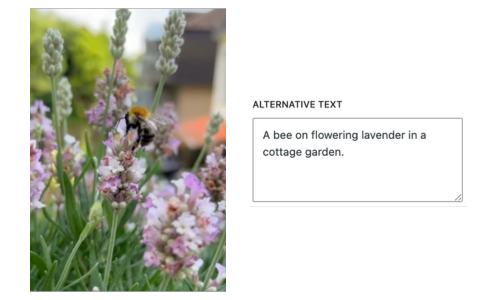
Name your images on your computer before uploading them to your website’s media library. Use your target keyword, for example, our landscape gardener’s blog post might be ‘7 pollinator friendly plants for a cottage garden‘ and they might name their images like this:
pollinator-friendly-plants-cottage-garden-lavender.jpg
pollinator-friendly-plants-cottage-garden-salvia.jpg
pollinator-friendly-plants-cottage-garden-cosmos.jpg
Use – in between words.
I’ll be writing a blog post soon about optimising images, so I’ll link that here when it’s done!
What is alt text?
Alt text (or alternative text) is a description of what an image shows. It gives context to anyone using a screen reader, making it important for accessibility on your website.
Search engines also use alt text to work out what the content of the image (and the webpage it’s on) is.
The focus should be on describing the image for those using screen readers, but adding keywords where possible and to some images in your blog post is helpful.
Don’t just list loads of keywords, though. Remember: you’re describing the image.
6. Add a metadescription
Somewhere in your blog editor, there’ll be an option to add a metadescription. Don’t leave this blank!
A metadescription is shown on a search result page underneath your blog title. If yours is blank, Google will create it automatically (in fact, sometimes Google does this even if you’ve included one yourself). But it won’t take long to add your own and this ensures your keyword is included!
Your metadescription should be about 150-160 characters long, including spaces. Any longer and Google will cut some off.
Here’s an example:

The metatitle here is in blue (a clickable link) and the metadescription is below.
7. Include links to other parts of your website 🔗
Make sure to include links in your blog post that send your reader to other parts of your website.
This will extend the user journey on your site, which tells Google they’re engaged with what you do, and also means they’re seeing more of the valuable content you’ve written or the products and services you sell.
Ensure the links are relevant to what you’re writing about in the current article and don’t put too many in. You shouldn’t link to every blog post you’ve ever written just because it’s another link, but look at how I’ve included links in this article. I’m pointing you and my other readers to other blog posts I think you’ll find helpful, and my blogging services in case you need more support.
Top tip for linking: Make your links spread over multiple words, rather than just one. This makes it easier for your reader to actually click the link.
For example:
“Get in touch here if you’re interested in working together” is less ‘clickable’ than “Get in touch here if you’re interested in working together“.
Linking to other website’s can help your reader find the information they might be looking for, but don’t do too much of this — you want to keep people on your website as long as you can!
8. Proofread and check ✅
Now all the hard work is finished, it’s time to proofread your article.
Top tip when it comes to proofreading from someone who writes for a living — read it out loud. This will help you see where you stumble, where the words don’t really flow, and where you’ve made a typo or mistake.
You can also use a tool to help with spellcheck, grammar and even tone, like Grammarly.
Once you’re happy that your blog post is accurate and clear, check your links are all working. It’s frustrating as a reader to click a link and find yourself in the wrong place, but also frustrating for you if you’re missing out on traffic you’re expecting because of an incorrect link.
Blogging SEO basics FAQs
How can I find out what keywords to use?
There are plenty of keyword research tools out there. The big names include Semrush and Moz. These are powerful tools, but they cost a lot per month, as they’re typically used by agencies and larger businesses.
If you’re a small business owner, you probably don’t want to be spending big chunks per month on a keyword research tool (Semrush, for example, costs $140 per month!).
My keyword tool of choice is Keysearch
I use and recommend KeySearch, which does everything I need as a blog and content writer for multiple brands, so will do what you need for your small business too! It’s easy to use, with guidance and tutorials, and can be cancelled at any time if you pay monthly.
At the time of writing, KeySearch costs $24 per month. Find out more about why I love it and get 20% off the first three months here (I get a little kickback for recommending it – thank you).
What should I blog about?
Blog about topics related to your business and what you sell. Think about the questions your clients or customers frequently ask you, the common discussions in your industry and so on.
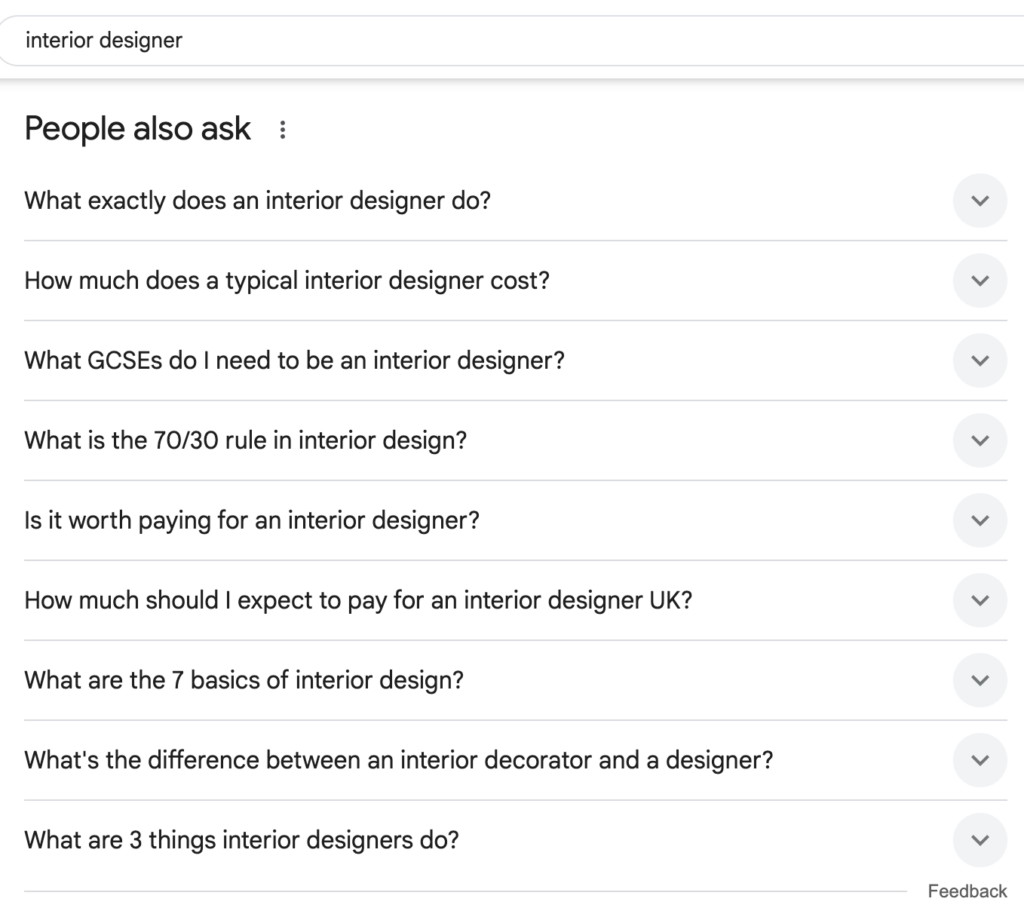
You can also look at the People Also Ask function on Google search pages. Type in your role/business area and see what people search linked to that. Below is an example for ‘interior designer’. You could pick out some of those questions to write a blog post about, or they might inspire other ideas. Remember, think about what your ideal client/customer will be asking – the GCSE question is most likely not top of their list!
Do I need a blog for my business if I post on social media regularly?
The great thing about blog posts is that they last. Posts written years ago can still bring a lot of traffic to your website, whereas posts on social media have a much shorter shelf life, so the effort to reward to reward ratio is smaller.
Many businesses like to use both, and they repurpose blog content into shorter snippets on their social media (that’s what I do!).
Your blog keeps working for you while you do other things, whereas social media relies on you creating new content regularly.
How else can I promote my blog post?
Search engine optimisation should be a focus, but here are some other ways you can get even more eyes on your post.