


We all know that big businesses and governments have a pivotal role to play in dealing with the climate crisis. But so do we, as individuals and as small business owners. There’s always something we can do to reduce our impact on the planet, and as a millennial content and SEO writer who grew up on MSN and Bebo, and still spends a whoooole lotta time online, I’m sharing 12 ways that you can lower your digital carbon footprint by making changes to your website.
What is a digital carbon footprint?
A digital carbon footprint refers to the greenhouse gas emissions of internet and app use, and all online activities.
It’s often overlooked, as it’s not as obvious as whether you’re recycling or not. But every open of Instagram, every video watched on Youtube, every email sent and received, and every visit to a website has an environmental impact.
Your small business website’s digital carbon footprint
Small business owners who are trying to be more sustainable environmentally might think about changing their packaging materials, recycling, limiting their printing and partnering or collaborating with fellow sustainable businesses. But reducing your digital carbon footprint might play an even bigger role in keeping your business as eco-friendly as you can.
One way to improve your small business’ environmental impact is to look at your website. For many small business owners, your website is the element you have the most control over. You can’t really, for example, change the environmental impact of your Instagram marketing without just reducing how much you post altogether. But your website? That you have more control over.
First up, find out how your website’s performing
Before you can improve anything, it’s good to understand where you stand. Maybe your website’s already got a low digital carbon footprint, in which case you might want to skip down to the section on other ways to reduce yours. But let’s check first.
To find out your website’s environmental impact, visit websitecarbon.com, the ‘original Website Carbon calculator’.
This is a fab website where you can, completely free of charge and without signing up, find out an estimate of the carbon footprint of any website on the internet.
Type in your URL (e.g. byniobe.com) and it will soon share your rating. Here’s mine, as of November 2023.

The page will go on to give more information, including how many grams of CO2 is produced when people visit your webpage or whether you’re using sustainable energy to host your site or not (more on that later).
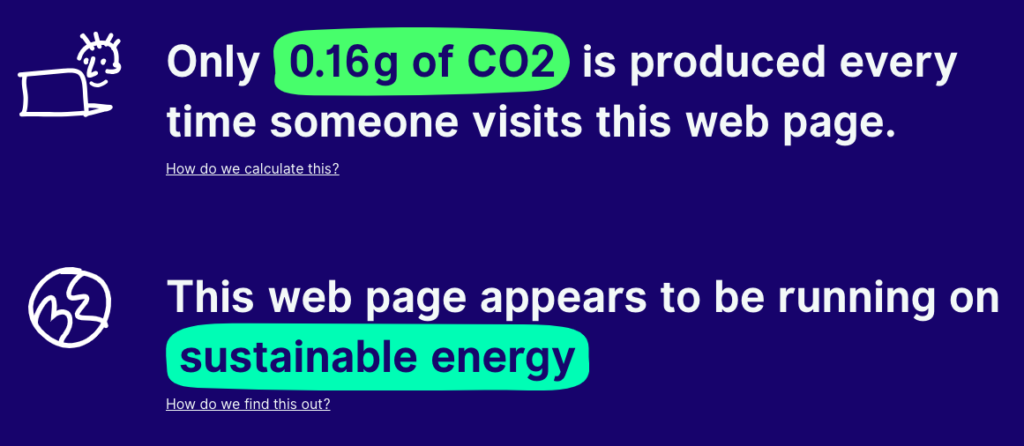
I love that they also give comparisons to how many cups of tea, bubbles or trees this equates to. Before you’re shocked by these numbers, type in how many monthly visits you get.
How to improve your website’s carbon footprint
So now you know your score, you can look at how to improve it. At the time of writing, my website is rated an A. That’s great, but I’ll caveat this with the fact I want to be adding lots more content and some additional pages, which could each make my rating worse.
As a business owner, you can’t simply stop your marketing, and I’m not suggesting you do. But, there are things you can do to ensure that all those beautifully designed and search engine optimised pages on your website are also as planet-friendly as possible too.
Check your images
Limit the number of images you use, and make the file size as small as possible, while still looking good!
1 🌍 Use a website like tinypng to resize your images.
2 🌍 Implement lazy load to your images. Put simply, this is where images further down a webpage (which users have to scroll to) don’t load immediately when the page is opened. By the time the user has scrolled down to these images, they will have loaded.
Check your videos
Do you really need video on your website? While they definitely look great, and are sometimes essential, they really not that environmentally friendly.
3 🌍 If you do need to use video, don’t set it to autoplay.
4 🌍 Keep video content short.
5 🌍 Avoid hosting videos on your website (by uploading them directly to your website’s media library). Instead, embed links from video hosting websites like Youtube or Vimeo.
Remove unnecessary content
Websites, like your Google Drive, computer’s folders, or your cupboard under the stairs, often end up cluttered. And just like the old winter coats, camping stove and untouched sewing machine in your cupboard, files and pages on your website take up space. It’s a good idea to have a clean up every few months. Here are some ideas of what to do:
6 🌍 Remove old photos from the media library. If you’ve had a swanky new batch of headshots, or you’ve changed your product lines, delete the old photos you won’t be using anymore. Save them to a hard drive if you want to back them up.
7 🌍 Consider deleting pages and blog posts that are rarely looked at. Check your site analytics. If you have posts and pages that aren’t performing, get rid!
8 🌍 …OR make those pages more valuable for your audience and business. Take time to rewrite them to improve their SEO, so that they can bring people to your website.
Choose a green web host to really improve your digital carbon footprint
According to the Chartered Institute of Ecology and Environmental Management, hosting accounts for around 15% of your website’s carbon footprint. Switching to a green provider can therefore have a big impact!
9 🌍 Take a look at The Green Web Foundation. There, you can check whether your website runs on green energy.
10 🌍 Use their directory to find a green host in your country.
I recently switched from GoDaddy to Eco Hosting. The Eco Hosting team made this really simple, and the cost for my website is roughly the same. I highly recommend them!
Optimise your website
Remember, every interaction on your website uses energy. So make them worthwhile!
11 🌍 Think about your user experience (UX). Make it as easy for people as possible to find what they’re looking for and action it. Consider changing your menu so it’s quicker and easier to find certain things. Can you make your checkout any smoother? Make the process simple!
12 🌍 Use keywords and other search engine optimisation principles to ensure the right people are finding your website quickly through search.
Less scrolling Google = less carbon used.
You might also like: 10 ways to reduce your digital carbon footprint which has even more tips (not website specific!)
Other benefits
It’s not just the environment that will benefit from you making these changes. They will all help enhance your website’s performance too.
Here’s why:
– Smaller images/video take up less space in the cloud and have faster load times
– Faster load times keep people on your pages. Lazy loading also helps speed it up!
– Deleting pages and plug-ins makes your website smaller (and also spots people finding old stuff you don’t want them seeing anymore!)
– Users will find the info they need quicker (which could get you more clients/customers, woo!)
– They limit how much time people spend online – better for the planet, and their life!